
The Course Hub allows you to list your courses so other LearnWorlds schools can license and resell them, helping you generate additional revenue while keeping full control of your content.
In this guide, you’ll learn how to manage your listing, adjust pricing, understand listing statuses, and optimize your course to attract more Buyers.
Pricing guidelines
Setting the right price is essential to making your course attractive to Buyers while maintaining profitability.
- Benchmark similar offers: Explore courses with a similar topic, level, and depth to understand what a reasonable per-enrollment licensing fee looks like within your category.
- Design for reseller margin: Keep in mind that Buyers will apply their own markup. Between platform fees, taxes, and their profit margin, your licensing price should allow them to price the course competitively while still earning a sustainable return.
A pricing structure that works for both sides increases your chances of consistent licensing. - Test and adjust over time: You can revisit pricing as you see how the course performs in the Course Hub, if it sells quickly, you may experiment with gradual increases; if adoption is slow, consider lowering the fee or improving your positioning first.
Price changes apply to new licensing agreements only. Existing agreements continue under the terms originally set.
 Pricing changes do not affect active licensing agreements. Buyers under an active agreement continue under the previously agreed terms until expiration.
Course listing statuses explained
Your Course Hub listing can have one of the following statuses:
- Draft → Not visible to Buyers. Fully editable.
- In Review → Under LearnWorlds review. Editing is locked.
- Published → Live in the Course Hub catalog.
- Unpublished → Removed from the catalog, but existing licenses remain active.
You can permanently delete a course only while it is in draft status.Unpublish a course
You can unpublish a course if you wish at any time and for any reason. To unpublish a course Go to My Listings → Locate the published course you want to remove → Select Unpublish → Confirm your action.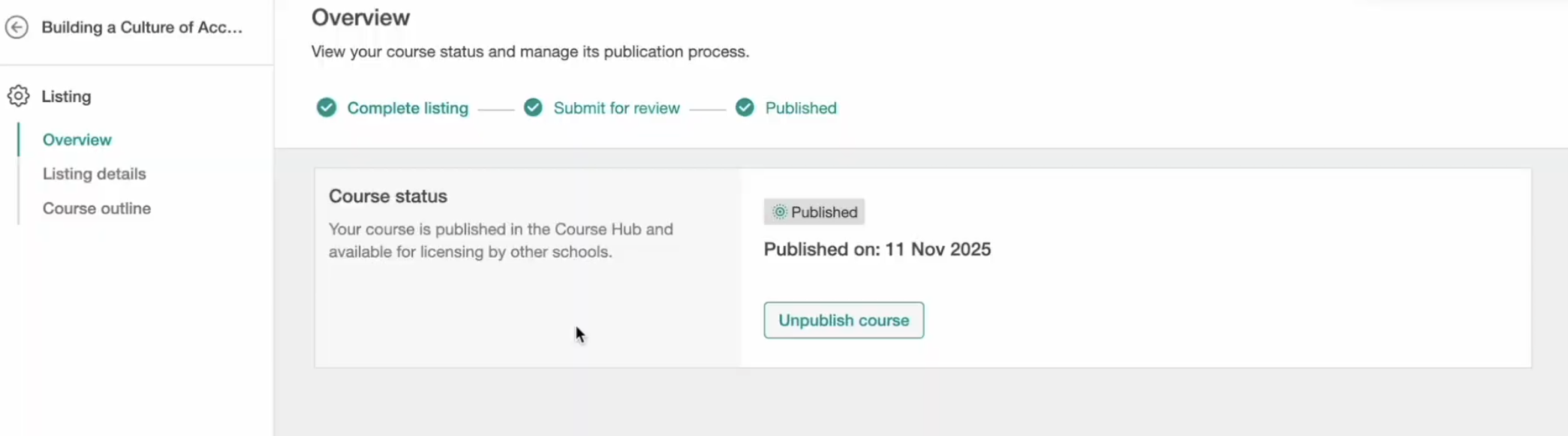
When you unpublish a course:
- It is removed from the Course Hub catalog
- New Buyers cannot license it
- The listing page may still be accessible via direct link
- Existing licensing agreements and learner access remain unaffected
- Already enrolled learners keep access according to their Buyer school settings
This allows you to stop new licensing without disrupting active agreements.
Updating a published listing
When you edit certain listing elements (such as key text, media, or category), a new draft version may be created and submitted for approval. If re-approval is required:
- A new draft version is created
- It enters the review process again
- Editing is temporarily locked
- The currently published version remains live until the update is approved
On the course Overview page, you can view both the published version and the draft or rejected version, along with any feedback provided by LearnWorlds.
This process ensures uninterrupted availability while changes are being reviewed.
Content protection & buyer limitations
Your intellectual property remains protected when another school licenses your course. When a school licenses your course, Buyers can:
- Rename the course
- Set their own learner pricing
- Customize their course page
- Configure course experience settings
However, they cannot:
- Edit your course content
- Export or duplicate your content
- Access your original media files
- Reuse sections in other courses
Your original structure and content remain secure at all times.
Published courses performance stats
In the Published courses table, you can track key performance data for each Course Hub course, including:
- Listing status (Draft, In Review, Published, Unpublished)
- Number of schools that have licensed the course
- Price per enrolment
- Total enrollments across all active and past licensing agreements
- Gross revenue generated through the Course Hub
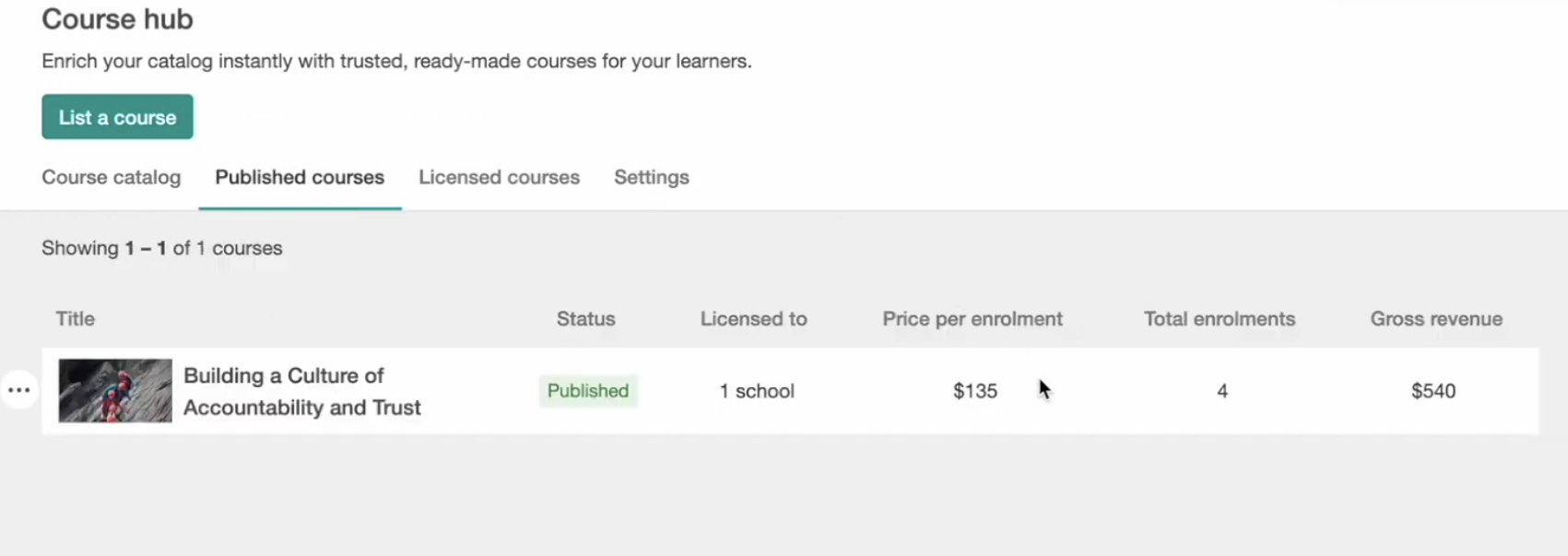
These insights are refreshed periodically and can help you identify which courses perform best and which ones may need improved pricing, stronger positioning, or updated content presentation.
-Gross revenue reflects license fee earnings before Stripe processing fees, platform fees, or taxes.Optimizing your listing
To increase visibility and improve adoption, make sure your listing is complete, clear, and resale-ready.
Here are a few best practices:
- Use an outcome-focused course title
- Include a strong preview video
- Write clear, structured descriptions that highlight key benefits
- Ensure the course works as a standalone product for different audiences
- Review your performance stats regularly and refine your listing over time
Small improvements to pricing and presentation can significantly increase licensing activity and long-term revenue.