
Before purchasing the LearnWorlds Mobile App add-on, it’s helpful to understand what the process looks like, what you’ll need to prepare, and what to expect along the way.
This guide provides a clear, realistic overview so you can plan ahead and move smoothly from purchase to launch.
What happens after you purchase
Once you purchase the mobile app add-on, the process moves through a few key stages:
1. Setup & preparation (customer-led)
- Create your Apple and Google developer accounts.
- Prepare your branding and app store assets.
- Configure your app inside LearnWorlds.
2. Review & build (shared)
- Submit your app setup for review.
- LearnWorlds reviews your configuration and guides you on any required adjustments.
3. Submission (LearnWorlds-led)
LearnWorlds handles the technical build and submission to the app stores.
4. Store review (external)
Apple and Google review your app.
5. App goes live
Your app is published and available to users.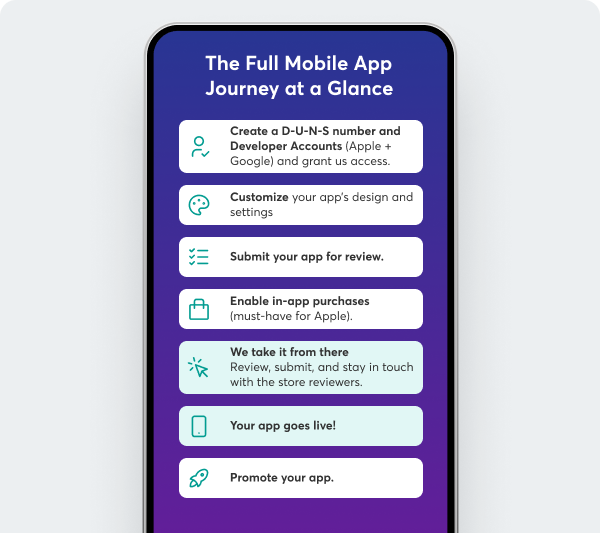
Timeline expectations
- Preparation phase: a few days to a few weeks (depending on your readiness)
- Store review:
Google Play: ~1–3 days
Apple App Store: ~3–7 days
D-U-N-S number
To publish your app, you’ll need an organizational D-U-N-S number.
- If you already have one → you can proceed with developer account setup
- If you don’t → it may take up to 30 days to obtain
 We recommend requesting your D-U-N-S number before purchasing, as it can significantly reduce your overall launch time.
How to prepare before purchasing
You don’t need to have everything ready before purchasing. However, preparing in advance can help speed up the process later. We recommend preparing:
Your accounts
App assets
- App name
- Logo and app icon
- Screenshots
- App description
Content readiness
- Courses organized and ready
- Navigation and structure reviewed
These are recommendations, not requirements, but having them ready will make the submission process smoother.Costs to consider
For your mobile app you will need:
- Learnworlds' mobile app add-on (subscription-based, separate to your LearnWorlds academy subscription).
- Apple Developer Program: $99/year or/and,
- Google Play Developer account: $25 one-time.
These accounts are required to publish your app in the stores and are managed directly by Apple and Google.
In-app purchases: What they are and how they work
In-app purchases allow users to buy content (such as courses or subscriptions) directly within your mobile app using Apple or Google’s payment systems.
This reduces checkout friction, making it easier for users to complete purchases with just a few taps.
What you should know:
- You do not need to offer all your products as in-app purchases
- You can choose which products are available in the app
For Apple submission process you need to set up at least a free in-app purchase.LearnWorlds supports:
- One-time purchases (e.g. individual courses)
- Subscriptions (recurring access to content)
Store commissions
When using in-app purchases, app stores apply a commission:
- Google: 15% (up to $1M revenue)
- Apple: up to 30%
This is a standard requirement set by the app stores.
Even if you don’t plan to sell through in-app purchases, offering free content can help increase downloads and engagement.Content setup & responsibilities
Regarding your content,
- You don’t need to duplicate your courses for the mobile app.
- Your published content will automatically be available in the app via the Mobile App tab.
However, to get your app ready for submission, you will need to:
- Set up your app structure (navigation, pages, etc.)
- Provide branding and app store assets
- Configure required settings (including in-app purchases, if used)
- Share necessary information for app store submission
Now let's see what LearnWorlds handles. LearnWorlds will:
- Provide the mobile app infrastructure
- Offer a 1:1 onboarding call (included in the add-on)
- Review your app before submission
- Handle the technical build and submission
- Manage communication with Apple and Google until your app is live
To support you throughout the process, you can explore:
You can find all related support articles here.